Integrating Wireless Charging into Office Furniture
Learn how to integrate wireless charging into office desks and meeting tables, including placement, power requirements and planning before manufacturing.
Makaseb
November 11, 2026 at 7:37 pm AST
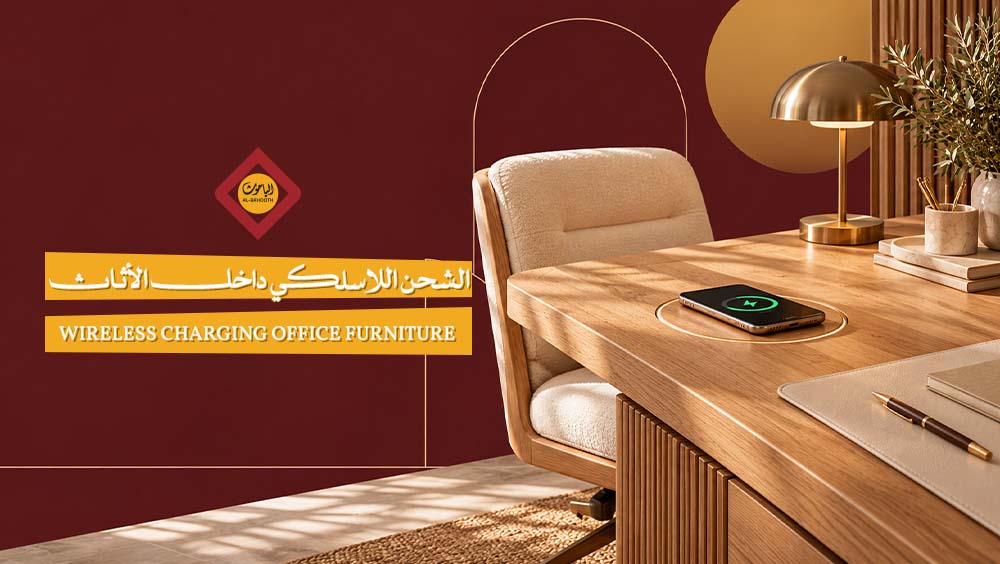
Many office fit-out and project managers wonder whether wireless charging can be integrated into furniture without disrupting the surface's appearance or functionality. The direct answer is that this is entirely possible by installing a suitable charging unit beneath the surface or inside a designated cutout, allowing a phone to charge immediately upon being placed over a specific spot without any visible cables. However, the suitability of this solution depends on precise factors, including the phone's compatibility with the built-in charging unit, the material and thickness of the surface, the location of the charging point, and how the unit is connected to a power source.
It is recommended to consult with Qassim Furniture Factory to discuss charging placement and the requirements of each project within custom furniture designs. Note that the suitability of each design for implementation varies depending on the nature and intended purpose of the piece.
How Wireless Charging Works Inside Furniture
A piece of furniture does not generate any electrical energy on its own; rather, it houses a charging unit connected to a power source. Energy transfers from this unit to a compatible device when placed in the correct position on the surface. This principle forms the foundation of wireless charging integrated into furniture, illustrating how desks and tables can seamlessly adapt to the daily usage needs of modern devices.
1. Energy Transfer Between the Charging Unit and the Phone
The charging unit built into the furniture converts electric current into a magnetic field that transfers to the phone or any device equipped with wireless charging capabilities, converting the energy within the device into active battery charging. This process requires the device to be compatible with this technology, as not all phones can receive energy in this manner.
2. The Role of the Charging Point and Phone Alignment
The transmitting coil is located inside the charging unit fixed within the furniture, while the receiving coil resides inside the phone itself. The distance between the two coils and their alignment directly impacts charging efficiency. The presence of a hidden wireless charger does not mean that just any spot on the tabletop will charge the phone; rather, the device must be placed precisely at a specific point.
- Transmitting Coil: Located within the charging unit built into the furniture piece and serves as the primary power source.
- Receiving Coil: Located inside the phone, receiving energy from the transmitting coil when brought into close enough proximity.
- Alignment: Placing the phone accurately over the charging point determines whether the charging process succeeds or fails.
- Distance: Increasing the gap between the surface and the phone—such as using a thick protective case—can hinder energy transfer.
3. Difference Between Hidden Charging and Surface-Mounted Chargers
Methods of integrating this technology into furniture vary based on the position of the unit: there are hidden units beneath the tabletop, and recessed units embedded directly into the body of the piece itself. Both require careful study of the furniture design and space distribution during manufacturing. In contrast, a separate charging pad placed on top of the furniture is an independent charger and is not considered integrated into the piece, even though it performs a similar charging function.
Where to Use Built-In Charging in Furniture
Wireless charging in furniture is not limited to individual desks; it extends to any surface where a phone is routinely placed, whether in a workspace or at home. The location and function of the furniture piece determine the most appropriate spot for the charging point, which requires examining each case individually before approving the design.
1. Charging Points in Individual Desks
Installing wireless charging in individual office desks requires identifying a position close to the user without interfering with the writing space, computer screen, or other accessories on the surface.
- Proximity to the User: It is preferable for the charging point to be directly within arm's reach without needing to stretch fully.
- Avoiding Work Interference: Sufficient space must be kept clear for writing, placing computers, and handling papers away from the charging zone.
- Visual Accessibility: It is recommended that the location be clear so it can be easily identified without having to search for it every time.
2. Charging Points in Conference Tables
Wireless charging for a conference table differs from an individual setup. It requires determining the number of potential users and distributing charging points along the length of the table to ensure everyone present can access one without disturbing others.
- Number of Charging Points: Determined based on the expected number of seats around the table and project requirements.
- Even Distribution: It is best to distribute points in a balanced manner to avoid overcrowding on one side of the table.
- Easy Access: Points should be placed in clear, accessible locations during meetings without requiring awkward body postures.
- Cable Management Beneath the Table: The success of the design depends on organizing cables and connections underneath the tabletop to maintain a neat appearance.
3. Built-In Charging in Side Tables
In home side tables, the standard charging spot provides a convenient location to place a phone while relaxing in the living room or lounge. Adopting this design requires examining the surface material and thickness, as these factors affect the efficiency of power transfer to the phone. Additionally, the location of a nearby power source must be considered before determining where to place the charging unit, ensuring the design matches the actual usage of the piece.
4. Selecting Charging Placement Based on Furniture Usage
The feasibility of wireless charging inside furniture is not universal; the final decision depends on the actual design of the piece and the specifications of the approved charging unit. An individual desk used for daily writing requires a different placement than a conference table meant to accommodate multiple people simultaneously, and both differ from a residential side table meant for relaxation. It is recommended to tie the placement decision to the daily usage nature of the piece prior to manufacturing.
Qassim Furniture Factory (Bahooth) provides local furnishing and manufacturing solutions that take these considerations into account when integrating charging units into office and residential furniture, matching project requirements and specifications for each piece.
Options for Installing the Charging Unit in Furniture
The physical implementation of wireless charging inside furniture varies according to the approved installation method. Some surfaces allow the unit to be mounted from underneath, others require a recessed cutout, and some leverage existing cable management grommets. Each method has distinct requirements regarding thickness, space, and finishing.
1. Undermounting Beneath the Furniture Surface
Undermounted chargers work well when the surface thickness and material allow for the unit's specified operating distance, letting the charging field pass through the furniture surface without obstructions preventing energy delivery to the device placed above.
- Mounting Method: Installing the unit requires an appropriate fastening mechanism to keep it securely in place underneath the surface without shifting.
- Maintenance Access: It is advisable to provide future access to the unit if maintenance or replacement is needed.
- Thickness and Material: The surface type and thickness dictate its suitability for this installation type prior to making any modifications.
2. Recessed Installation Inside a Dedicated Cutout
Recessed installation relies on making a precise cutout that fully accommodates the unit, offering a broader space to align the placement of the wireless charging point with the overall surface design.
- Unit Dimensions: Implementation requires precisely measuring the dimensions of the recessed unit before marking the cutout position.
- Cutout Depth: The depth of the cutout must match the unit's thickness to ensure stability within the surface.
- Edge Finishing: The perimeter of the cutout requires meticulous finishing to maintain the surface's appearance and prevent edge wear from frequent use.
3. Utilizing Existing Cable Management Grommets
Installing a charging unit inside a cable management opening is an option tied to specific factors, rather than an automatic substitute suitable for every desk or conference table. Its application depends on the size of the opening itself, the type of unit being installed, and the existing wire routing, ensuring that the wireless charging path does not conflict with current cables.
4. Choosing Between Modifying Existing Pieces vs. Custom Manufacturing
For an existing piece, the decision starts by inspecting its original construction method and evaluating whether it can be modified to house a charging unit—either via undermounting or creating a recessed cutout. This inspection determines if modifications can be made without weakening the surface or ruining its finish.
For custom furniture, the unit's location and cable pathways can be determined prior to manufacturing, ensuring that space distribution and specifications align with project requirements right from the design phase. This approach offers greater flexibility in integrating wireless charging into furniture compared to retrofitting ready-made pieces.
Qassim Furniture Factory (Bahooth) provides furnishing and interior design solutions that accommodate project requirements from the outset, with options to specify finishes and space layouts suited to office and meeting room needs.
Phone Compatibility and Standards for Built-In Chargers
Once the integration method of the unit inside the furniture is established, practical success ultimately depends on phone compatibility with the charging unit, rather than the design of the piece alone. A successful wireless charging experience in furniture starts with understanding the standards the unit operates on and how well the phone supports them.
1. Phone Support for Qi and Qi2 Standards
The presence of a built-in charging unit inside a table or furniture surface does not automatically mean any phone can charge on it. It requires verifying that the phone supports the standard used by the unit, whether it is Qi or the newer Qi2 version.
- Device support for both standards varies depending on phone models and operating system versions.
- Pre-verifying the supported standard prevents unrealistic expectations regarding the built-in furniture charging experience.
- Some phones support only Qi without the additional Qi2 features.
2. The Difference Between Official Certification and "Compatibility" Claims
The phrase "Qi compatible" written on a product does not equal official certification within the Qi or Qi2 ecosystem. It is recommended to request the unit's model data and certification number, then independently verify it via the certified products database rather than relying solely on marketing descriptions.
- Officially certified products undergo rigorous testing requirements regarding safety and interoperability between devices.
- Certification numbers can be independently verified regardless of product descriptions.
- Certification does not prove the unit is suitable for every surface thickness or phone model, so installation and device specifications should be reviewed individually.
3. Impact of Phone Cases and Alignment During Use
The Qi2 standard supports magnetic alignment in compatible devices and accessories, but this feature is not available on every phone supporting general wireless charging. A phone case or added accessory can impact device alignment or the distance between the phone and the built-in charging unit; thus, it is advised to review specific phone and charger instructions rather than assuming all cases must be removed in every case.
4. Factors Determining Actual Charging Speed
The rated power of a charging unit differs from the power actually received by the phone and the charging times experienced by the user. The wireless charging experience in furniture is tied to multiple combined factors rather than a single fixed variable.
- Standard compatibility between the phone and the unit determines whether charging is possible at all.
- The power supply feeding the unit affects the actual available output.
- Precise alignment of the phone over the unit determines energy transfer efficiency.
- General operating conditions, such as device temperature, reflect directly on the observed charging speed.
The Effect of Furniture Material and Thickness on Charging
The success of wireless charging inside furniture is not tied to the name of the material alone, but rather to the actual structure of the surface: thickness, finishes, and internal layers are what truly determine integration feasibility, beyond just appearance.
1. Suitability of Wood, MDF, Laminate, and Glass
Certain materials allow for charging unit installation according to specific specifications, but this does not imply suitability for every thickness or finish:
- Natural Wood: May allow routing (milling) or undermounting depending on its thickness.
- MDF: A common material in office surfaces, its charging compatibility depends on the thickness of the board used.
- Laminate: Often used as a finishing layer over a wooden base, its impact on charging relates to total layer thickness.
- Glass and Certain Acrylics: May allow charging signals to pass through, but thickness remains a critical decision factor.
2. The Role of Surface Thickness in Unit Selection
The remaining surface thickness above the charging unit must match the operating limit specified by the manufacturer of the proposed unit. This becomes even more critical during undermounting or milling, as any excess desktop thickness beyond the allowed threshold can block signal transmission to the phone.
3. Impact of Metallic Layers on Charging Locations
It is recommended to check for metallic layers or internal metal reinforcement between the charging unit and the phone before deciding on an installation location, because metal directly blocks wireless charging signals. Surface appearance alone should not dictate the charging spot, as some surfaces may contain hidden internal cavities or framing invisible from the outside that impairs operation.
4. Testing the Charging Point Before Finalizing Finishes
It is advisable to test charging with a compatible phone at the proposed installation spot before finalizing table finishes, while marking a clear visual or design cue indicating the exact placement point for the phone. The following checklist helps with this step:
- Ensure charging stability when placing the phone in the designated center of the unit.
- Check for the absence of hidden metallic layers in the installation location.
- Measure the remaining surface thickness and match it with the unit's requirements.
- Repeat the test with multiple phones to ensure consistent results.
- Place a clear design marker identifying the charging point after verifying its efficiency.
Frequently Asked Questions
Below are direct answers regarding compatibility and installation decisions that readers need to know before discussing a furniture project.
1. Does built-in charging work with different phones?
Not every phone is chargeable this way; it requires the user to verify that their device supports the appropriate standard. It is also recommended to review the specifications of the charging unit and the case used on the piece, as their compatibility determines the efficiency of built-in furniture charging.
2. Can charging be added to existing furniture?
Undermounting or using a suitable cutout may be possible after inspecting the piece's material, thickness, construction method, and available electrical pathways. Do not assume every piece can be modified to house a charging unit without prior inspection.
3. Is the charging point obvious on the tabletop?
The charging point is marked above the unit's position using a visible marker or design element that is easy to notice when using the table. Placing the phone away from the internal coil position defeats the purpose of embedding the charger within the piece.
4. Can charging unit specifications be determined before manufacturing?
Qassim Furniture Factory (Bahooth) allows clients to discuss charging unit placement, finishes, and cable routing as part of custom furniture designs tailored to each project's requirements. Additionally, Bahooth Store provides furnishing solutions for projects that require matching furniture with actual usage needs.
Conclusion
The decision to integrate wireless charging inside furniture rests on a clear sequence of steps: identifying the furniture piece and suitable charging location, verifying phone compatibility with the wireless unit and its certification, matching material and thickness to installation requirements, and finally planning electrical routing and finishes prior to actual execution.
Wireless charging in furniture remains an option linked to the piece's use and design—whether dealing with an individual desk, a meeting table, or a home piece—rather than just a superficial addition detached from general product specifications. Space distribution and finishes determine how well a location suits this technology within the piece itself.
To discuss project requirements and prepare a price quote for custom furniture that includes appropriate wireless charging locations, you can contact Qassim Furniture Factory (Bahooth), which combines local design and manufacturing to meet diverse furnishing needs. When looking to equip comprehensive office spaces, Bahooth Furniture Company offers furnishing solutions covering office furniture and space planning tailored to the needs of each project.